

100% Accurate Answers! Jun-2025 GitHub-Actions Actual Real Exam Questions
Best Value Available! 2025 Realistic Verified Free GitHub-Actions Exam Questions
GitHub GitHub-Actions Exam Syllabus Topics:
| Topic | Details |
|---|---|
| Topic 1 |
|
| Topic 2 |
|
| Topic 3 |
|
| Topic 4 |
|
| Topic 5 |
|
NEW QUESTION # 19
Which of the following is the best way for an enterprise to prevent certain marketplace actions from running?
- A. Create a list of the actions that are restricted from being used as an enterprise policy. Every other action can be run.
- B. Create a list that is maintained as a . yml file in a . github repository specified in the enterprise. Only these actions can be run.
- C. Create a list of the actions that are allowed to run as an enterprise policy. Only these actions can be run.
- D. It is not possible; if an action is in the marketplace, its use cannot be restricted.
Answer: C
Explanation:
The best way for an enterprise to control which GitHub Actions run is by creating a list of approved actions as an enterprise policy. This approach restricts workflows to only use the actions that are explicitly allowed, ensuring security and compliance within the organization.
NEW QUESTION # 20
What is the smallest scope for an environment variable?
- A. the workflow env mapping
- B. a job
- C. the workflow settings
- D. a step
Answer: D
Explanation:
The smallest scope for an environment variable is within astep. Environment variables defined within a step are only accessible to that particular step, which makes it the smallest scope for a variable in a GitHub Actions workflow.
NEW QUESTION # 21
Which workflow commands send information from the runner? (Choose two.)
- A. setting a debug message
- B. setting output parameters
- C. reading from environment variables
- D. populating variables in a Dockerfile
Answer: A,B
Explanation:
Setting a debug message using ::debug:: command sends a message to the logs, helping with troubleshooting and providing insight into the workflow run.
Setting output parameters using ::set-output sends data from a job step to subsequent steps or jobs, which can be used later in the workflow.
NEW QUESTION # 22
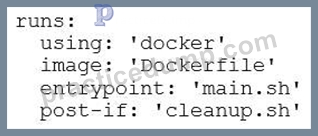
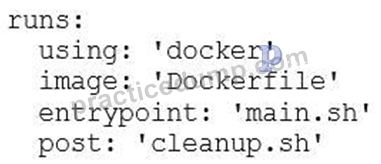
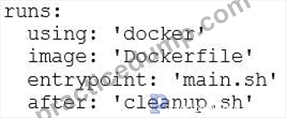
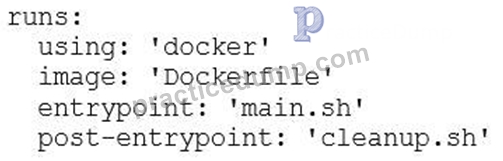
As a DevOps engineer, you are developing a container action. You need to execute a cleanup script after completing the main script execution. Which code block should be used to define the cleanup script?
- A.
- B.
- C.
- D.
Answer: B
Explanation:
The correct syntax for specifying a cleanup script to be run after the main entry point is executed in a Docker- based GitHub Action is to use thepostkey. This ensures thatcleanup.shruns after the main script (main.sh) has completed.
NEW QUESTION # 23
What are the two ways to pass data between jobs? (Choose two.)
- A. Use data storage.
- B. Use artifact storage.
- C. Use the copy action to save the data that should be passed in the artifacts folder.
- D. Use the copy action with cache parameter to cache the data
- E. Use job outputs
- F. Use the copy action with restore parameter to restore the data from the cache
Answer: B,E
Explanation:
Job outputs are used to pass data from one job to another in a workflow. A job can produce output values (like variables or files), which can be referenced by subsequent jobs using theneedskeyword and${{ steps.step_id.
outputs.output_name }}syntax.
Artifact storage allows data (such as files or results) to be saved by a job and then retrieved by another job in a later step. This is commonly used for passing large amounts of data or files between jobs.
NEW QUESTION # 24
In which scenarios could the GITHUB_TOKEN be used? (Choose two.)
- A. to publish to GitHub Packages
- B. to read from the file system on the runner
- C. to create issues in the repo
- D. to add a member to an organization
- E. to leverage a self-hosted runner
- F. to create a repository secret
Answer: A,C
Explanation:
The GITHUB_TOKEN is automatically provided by GitHub in workflows and can be used to authenticate API requests to GitHub, including publishing packages to GitHub Packages.
The GITHUB_TOKEN is also used to authenticate API requests for actions like creating issues, commenting, or interacting with pull requests within the same repository.
NEW QUESTION # 25
What menu options in a repository do you need to select in order to use a starter workflow that is provided by your organization?
- A. Actions > New workflow
- B. Actions > Load workflow
- C. Workflow > New workflow
- D. Workflow > Load workflow
Answer: A
Explanation:
To use a starter workflow provided by your organization, you need to go to the Actions tab in the repository and select New workflow. This option allows you to either create a new workflow or select from a list of available workflow templates, including starter workflows provided by your organization.
NEW QUESTION # 26
Without the need to use additional infrastructure, what is the simplest and most maintainable method for configuring a workflow job to provide access to an empty PostgreSQL database?
- A. Use service containers with a Postgres database from Docker hub.
- B. Dynamically provision and deprovision an environment.
- C. Run the actions/postgres action in a parallel job.
- D. It is currently impossible to access the database with GitHub Actions.
Answer: A
Explanation:
GitHub Actions supports the use of service containers, which allows you to spin up a PostgreSQL database (or any other service) in a Docker container during your workflow. You can pull a PostgreSQL image from Docker Hub, and the container will automatically be available to your workflow job. This method requires no additional infrastructure and is easy to configure and maintain, as you simply define the container in the workflow file.
NEW QUESTION # 27
Which action type should be used to bundle a series of run steps into a reusable custom action?
- A. JavaScript action
- B. Composite action
- C. Bash script action
- D. Docker container action
Answer: B
Explanation:
A composite action allows you to bundle multiple steps into a single reusable action within a workflow. It is composed of multiple run steps or other actions and can be reused across workflows, making it the perfect choice for bundling a series of steps.
NEW QUESTION # 28
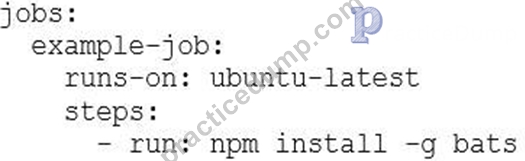
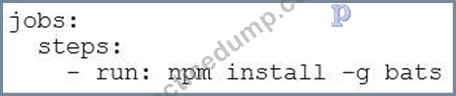
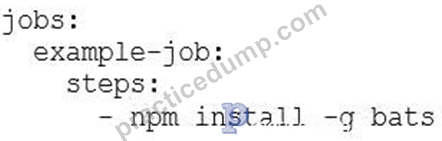
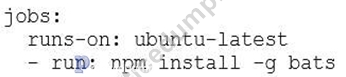
How should you install the bats NPM package in your workflow?
- A.
- B.
- C.
- D.
Answer: A
Explanation:
The correct syntax includes specifying the job (example-job), the runner (ubuntu-latest), and the necessary step (npm install -g bats) within the workflow. This ensures that the package is installed properly during the execution of the job.
NEW QUESTION # 29
As a developer, you are designing a workflow and need to communicate with the runner machine to set environment variables, output values used by other actions, add debug messages to the output logs, and other tasks. Which of the following options should you use?
- A. enable debug logging
E composite run step - B. workflow commands
- C. environment variables
- D. self-hosted runners
Answer: B
Explanation:
Workflow commands are special commands that allow you to interact with the runner, set environment variables, output values, add debug messages, and perform other tasks within the workflow. These commands are used to modify the environment or influence the behavior of the GitHub Actions runner.
NEW QUESTION # 30
Which syntax correctly accesses a job output (output1) of an upstream job (job1) from a dependent job within a workflow?
- A. ${{needs.job1.output1}}
- B. ${{needs.job1.outputs.output1}}
- C. ${{job1.outputs.output1}}
- D. ${{depends.job1.output1}}
Answer: B
Explanation:
Theneedscontext is used to reference the outputs of jobs that are dependencies of the current job. In this case, needs.job1.outputs.output1correctly accesses the output ofoutput1from the jobjob1in the dependent job.
NEW QUESTION # 31
As a developer, your Actions workflow often reuses the same outputs or downloaded dependencies from one run to another. To cache dependencies for a job, you are using the GitHub cache action. Which input parameters are required for this action? (Choose two.)
- A. restore-keys: the copy action key used with cache parameter to cache the data
- B. path: the file path on the runner to cache or restore
- C. ref: the ref name of the branch to access and restore a cache created
- D. cache-hit: the copy action key used with restore parameter to restore the data from the cache
- E. dependency: the name and version of a package to cache or restore
- F. key: the key created when saving a cache and the key used to search for a cache
Answer: B,F
Explanation:
The key is required because it uniquely identifies the cache. It is used to store and retrieve cached data. When creating or restoring a cache, you need to define a key that will be used to identify the cache.
The path is the file path on the runner that you want to cache. This is where the cached files or dependencies are located and should be specified to tell GitHub where to store or retrieve the cache from.
NEW QUESTION # 32
Which files are required for a Docker container action in addition to the source code? (Choose two.)
- A. metadata.yml
- B. action.yml
- C. Actionfile
- D. Dockerfile
Answer: B,D
Explanation:
Dockerfile: TheDockerfileis required for Docker container actions. It defines the environment for the action, specifying the base image, dependencies, and any commands to set up the action's runtime inside the container.
action.yml: Theaction.ymlfile is required for all GitHub Actions, including Docker container actions. It contains metadata about the action, including the inputs, outputs, and the runtime environment (which in this case is Docker, defined underruns.using).
NEW QUESTION # 33
Which workflow command would output the debug message "action successfully debugged"?
- A. echo "::debug::action successfully debugged"
- B. echo :debug::message=action successfully debugged"
- C. echo ":debug:action successfully debugged:"
- D. echo "debug-action successfully debugged"
Answer: A
Explanation:
The ::debug:: syntax is used to output debug messages in GitHub Actions workflows. This command will print the message "action successfully debugged" in the debug logs when the workflow runs.
NEW QUESTION # 34
You are reaching your organization's storage limit for GitHub artifacts and packages. What should you do to prevent the storage limit from being reached?
- A. via the .github repository owned by the organization
- B. via repositories owned by the organization
- C. via a repository owned by a third party
- D. via the GitHub Marketplace
Answer: B
Explanation:
To prevent reaching the storage limit for GitHub artifacts and packages, you should manage and clean up artifacts and packages stored in repositories owned by your organization. This includes deleting unnecessary artifacts and managing the lifecycle of packages, as they contribute directly to your organization's storage quota.
NEW QUESTION # 35
You need to trigger a workflow using the GitHub API for activity that happens outside of GitHub. Which workflow event do you use?
- A. repository_dispatch
- B. deployment
- C. workflow_run
- D. check_suite
Answer: A
Explanation:
Therepository_dispatchevent allows you to trigger a workflow in response to external activity. It is commonly used when you need to trigger a workflow from outside GitHub, such as from another system or service, by sending a request to the GitHub API. This event provides flexibility to integrate with various external systems and trigger workflows in a GitHub repository.
NEW QUESTION # 36
Which default GitHub environment variable indicates the name of the person or app that initiated a workflow?
- A. ENV_ACTOR
- B. GITHUB_ACTOR
- C. GITHUB_WORKFLOW_ACTOR
- D. GITHUB_USER
Answer: B
Explanation:
The GITHUB_ACTOR environment variable indicates the name of the person or app that initiated the workflow. This variable is automatically provided by GitHub in the workflow and can be used to identify the user or application triggering the workflow.
NEW QUESTION # 37
As a developer, your self-hosted runner sometimes looses connection while running jobs. How should you troubleshoot the issue affecting your self-hosted runner?
- A. Access the self-hosted runner's installation directory and look for log files in the _diag folder.
- B. Locate the self-hosted runner in your repository's settings page and download its log archive.
- C. Start the self-hosted runner with the --debug flag to produce more verbose console output.
- D. Set the DEBUG environment variable to true before starting the self-hosted runner to produce more verbose console output.
Answer: A
Explanation:
When troubleshooting a self-hosted runner, you can access the_diagfolder located in the self-hosted runner's installation directory. This folder contains diagnostic logs that can help you identify the root cause of issues, such as connection problems.
NEW QUESTION # 38
What metadata file in a custom action defines the main entry point?
- A. index.js
- B. action.js
- C. action.yml
- D. main.yml
Answer: C
Explanation:
The action.yml file is the metadata file in a custom GitHub Action that defines the main entry point, including information such as the inputs, outputs, description, and the runs key that specifies the main entry point (e.g., a script or a Docker container).
NEW QUESTION # 39
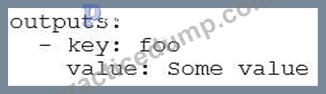
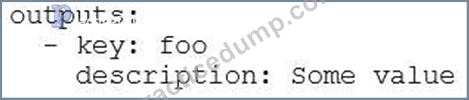
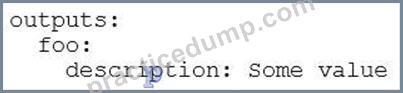
What is the minimal syntax for declaring an output named foo for an action?
- A.
- B.

- C.
- D.
Answer: B
Explanation:
The correct minimal syntax for declaring an output in GitHub Actions is by using thefookey underoutputs, and associating it with avalue(in this case,Some value). This is the simplest form to define an output in a workflow or action.
NEW QUESTION # 40
When reviewing an action for use, what file defines its available inputs and outputs?
- A. defaults.json
- B. workflow.yml
- C. action.yml
- D. config.json
- E. inputs.yml
Answer: C
Explanation:
The action.yml file defines the inputs and outputs for a GitHub Action. This file contains metadata about the action, including the required inputs and outputs, as well as other configurations like the action's description, runs, and environment setup.
NEW QUESTION # 41
Which workflow event is used to manually trigger a workflow run?
- A. status
- B. create
- C. workflow_dispatch
- D. workflow_run
Answer: C
Explanation:
The workflow_dispatch event is used to manually trigger a workflow run in GitHub Actions. You can specify this event in the workflow file to allow users to manually trigger the workflow from the GitHub UI, often with optional input parameters.
NEW QUESTION # 42
As a developer, you need to integrate a GitHub Actions workflow with a third-party code quality provider that uses the Checks API. How should you trigger a follow-up workflow?
- A. Add the pull_request webhook event as a trigger for the workflow when the code quality integration is synchronized
- B. Add the deployment webhook event as a trigger for the workflow when the code quality integration is completed
- C. Add the check_run webhook event as a trigger for the workflow when the code quality integration is completed
- D. Add the workflow_run webhook event as a trigger for the workflow for the code quality integration name
Answer: C
Explanation:
Thecheck_runevent is triggered when a check (such as a code quality check) completes, including when the status of a check changes. By adding this event as a trigger, you can initiate a follow-up workflow when the code quality integration finishes its checks.
NEW QUESTION # 43
......
Actual Questions Answers Pass With Real GitHub-Actions Exam Dumps: https://certkingdom.practicedump.com/GitHub-Actions-practice-dumps.html